
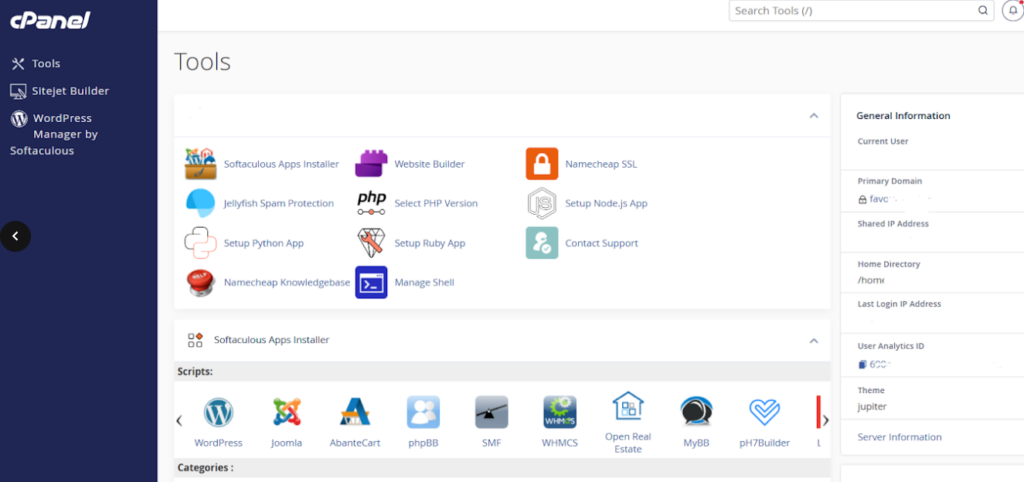
cPanel remains the undisputed industry-standard control panel for managing web hosting environments efficiently and securely. Whether you are provisioning corporate websites, managing multi-tenant SaaS applications, or overseeing client portfolios, cPanel bridges the gap between complex Linux server administration and intuitive graphical management. Mastering its core toolset empowers developers and system administrators to maintain absolute control over their digital infrastructure.
Navigating the cPanel Dashboard and File Manager
Upon logging into a cPanel account, administrators are greeted with a modular dashboard categorized into files, databases, domains, email, security, and advanced configurations. The built-in File Manager is particularly powerful, allowing developers to upload source code archives, modify configuration files, edit `.htaccess` rewrite rules, and manage file permissions without needing an external FTP client.
Understanding directory structures is vital. Keeping your application files organized within the `public_html` root directory ensures that incoming web requests map correctly to your core PHP scripts, index files, and asset repositories.
Database Administration via phpMyAdmin
Almost every dynamic web application relies heavily on a robust database backend. cPanel provides direct integration with MySQL databases and phpMyAdmin. Administrators can create new databases, assign specific database users with granular privileges, and execute raw SQL queries or database backups effortlessly.
Routine database maintenance—such as optimizing tables, repairing corrupted indexes, and exporting database dumps—can be executed in seconds, safeguarding application integrity against unforeseen data corruption.
Domain Addons, Subdomains, and SSL Management
Expanding digital assets often requires hosting multiple domains or setting up staging subdomains. cPanel's Domain section simplifies this process completely. Developers can provision addon domains that map to subdirectories within `public_html`, configure permanent 301 redirects to consolidate SEO ranking power, and manage DNS zone records (A, CNAME, TXT, MX records) with absolute precision.
Furthermore, automated SSL/TLS status panels ensure that all hosted domains and subdomains have active Let's Encrypt certificates installed, guaranteeing encrypted HTTPS communication for every visitor.
Conclusion
Mastering cPanel is an essential skill for modern full-stack developers and IT infrastructure managers. By leveraging its file managers, database tools, and domain management features, teams can deploy and maintain enterprise-grade web applications with speed and confidence.